How Investigators, Auditors and Compliance Teams Save Hours Cleaning Spreadsheets
The jobs that take the most time in investigations, audits and compliance work are rarely the clever ones. They are combining files from different sources, fixing names typed several ways, removing repeats, comparing this period with the last, and hiding personal data before a file is shared. BigXL does each of these with a preview and an undo, on your own computer, with no formulas and no upload.
Ask anyone who handles sensitive data for a living what eats their week, and the answer is almost never the clever part of the job. It is the preparation. The phone records that arrive in three different layouts. The vendor list where one supplier appears as five different names. The export that has to be anonymised before it can be sent to anyone else.
This post walks through five of those jobs, one at a time, for the people who meet them most: investigators, auditors, healthcare and HR teams, and legal staff. For each one you get the manual way, the BigXL way, and a real screenshot of the app doing it. Everything shown runs on your own computer.
A note on numbers. The examples use small made-up files so the screenshots stay readable. The point is the number of steps you stop doing by hand, not a promise about hours on your own data.
Job 1: Merging call records from different carriers (investigators)
The situation. A subpoena returns call records from three carriers. One file lists times in UTC, another in local time, and the third spells the headers differently. Phone numbers sit in different formats. You need one clean timeline.
The manual way. Open each file in Excel, hope the long numbers survive, retype or rename headers, convert time zones with formulas, copy and paste the three sheets into one, then sort. If one file is larger than a million rows, Excel quietly drops the rest.
The BigXL way.
- Open each file. Size does not matter, and the rows scroll before the file has finished loading.
- Fix the dates once with the date format tool. Where a date could be read two ways, BigXL shows you the choice instead of guessing.
- Stack the three files into one with Combine, matched by column name, with an extra column that says which file each row came from.
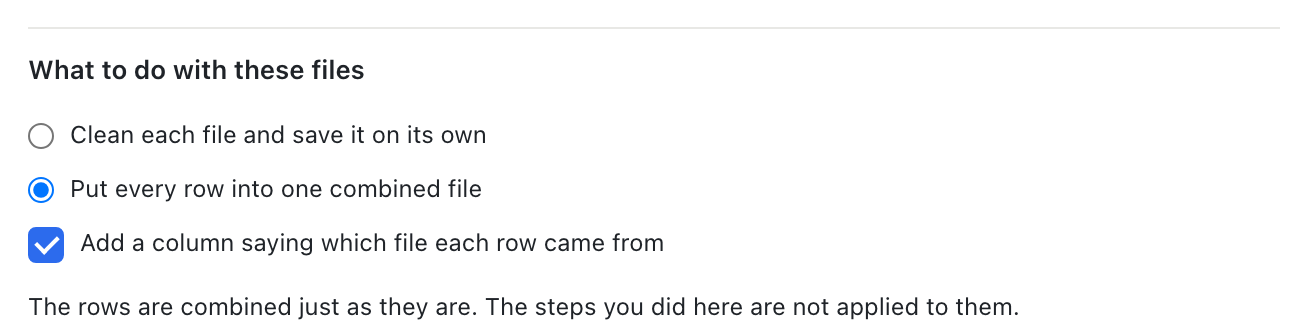
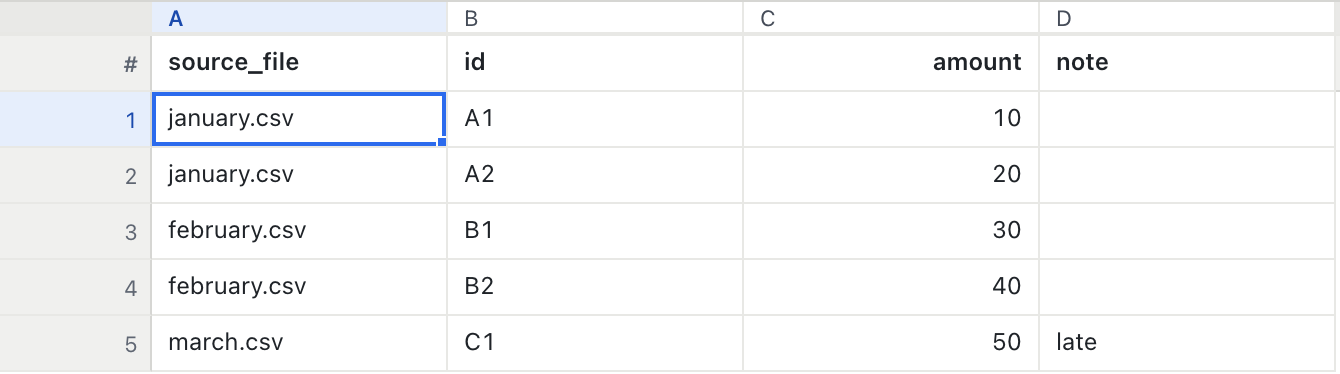
The source column matters more than it looks. When someone asks where a row came from, the answer is in the sheet.
If the same cleanup repeats on every return, record it once as a recipe and replay it on the next file. The whole story is in how to clean recurring CSV exports, and the telecom side is covered in call detail record analysis.
Job 2: Matching vendor names typed five ways (auditors and accountants)
The situation. An accounts payable ledger lists the same supplier as Meridian Freight, MERIDIAN FREIGHT, Meridian Freight. and meridian freight. A pivot table counts four suppliers. Duplicate payment tests miss real repeats because the names do not match.
The manual way. Sort the column, scroll, and fix names by hand. Or write a find and replace for each variant, one at a time, and hope you spotted them all. On a ledger with thousands of vendors this is where the afternoon goes.
The BigXL way. Open Merge similar spellings from the Clean menu, or press Cmd+K and type “similar”.
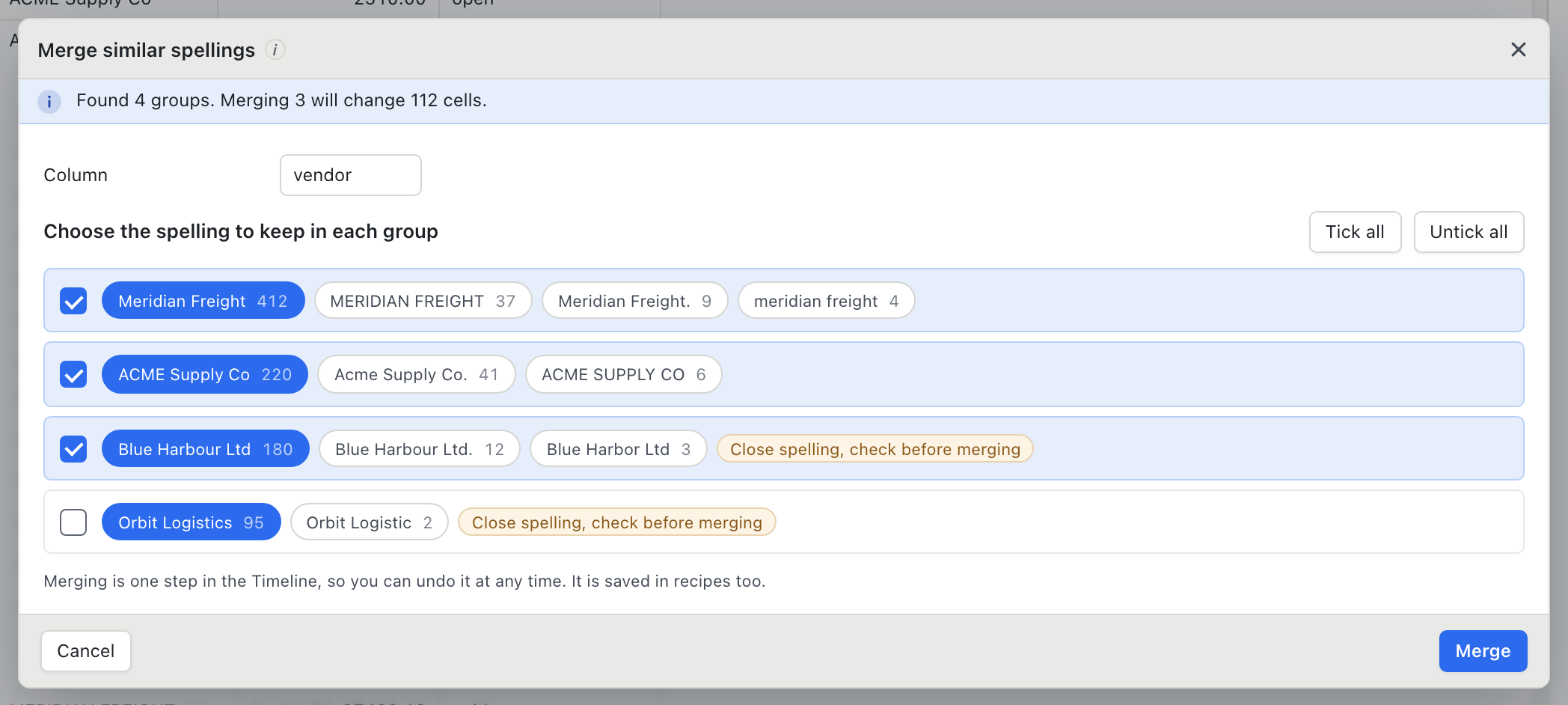
BigXL groups the values that differ only in capitals, spacing, punctuation or word order, and finds close spellings such as Blue Harbour Ltd and Blue Harbor Ltd. Three things make it safe to use on real books:
- Certain groups are ticked, close ones are not. Two names that look alike can be two different companies, so those wait for your eye.
- You choose the spelling to keep. Click any spelling in a group to make it the survivor. The message at the top says how many cells will change before you commit. In the screenshot, merging three groups changes 112 cells.
- Numbers keep names apart.
Invoice 1001andInvoice 1002are never grouped, however similar they look.
The merge is one step in the history, so you can undo it, and it is saved in recipes. Next quarter’s ledger gets the same fix in one click. This tool is part of BigXL Pro.
Job 3: Finding the repeats (auditors, finance, HR)
The situation. The same invoice was paid twice. The same employee appears in two exports. A repeat inflates a total, or worse, moves money twice.
The manual way. A COUNTIF helper column, a filter, then deleting rows by hand and hoping you kept the right copy.
The BigXL way. Open Remove duplicate rows, pick the columns that define a repeat (for example vendor, amount and due date), and read the count before anything is removed.
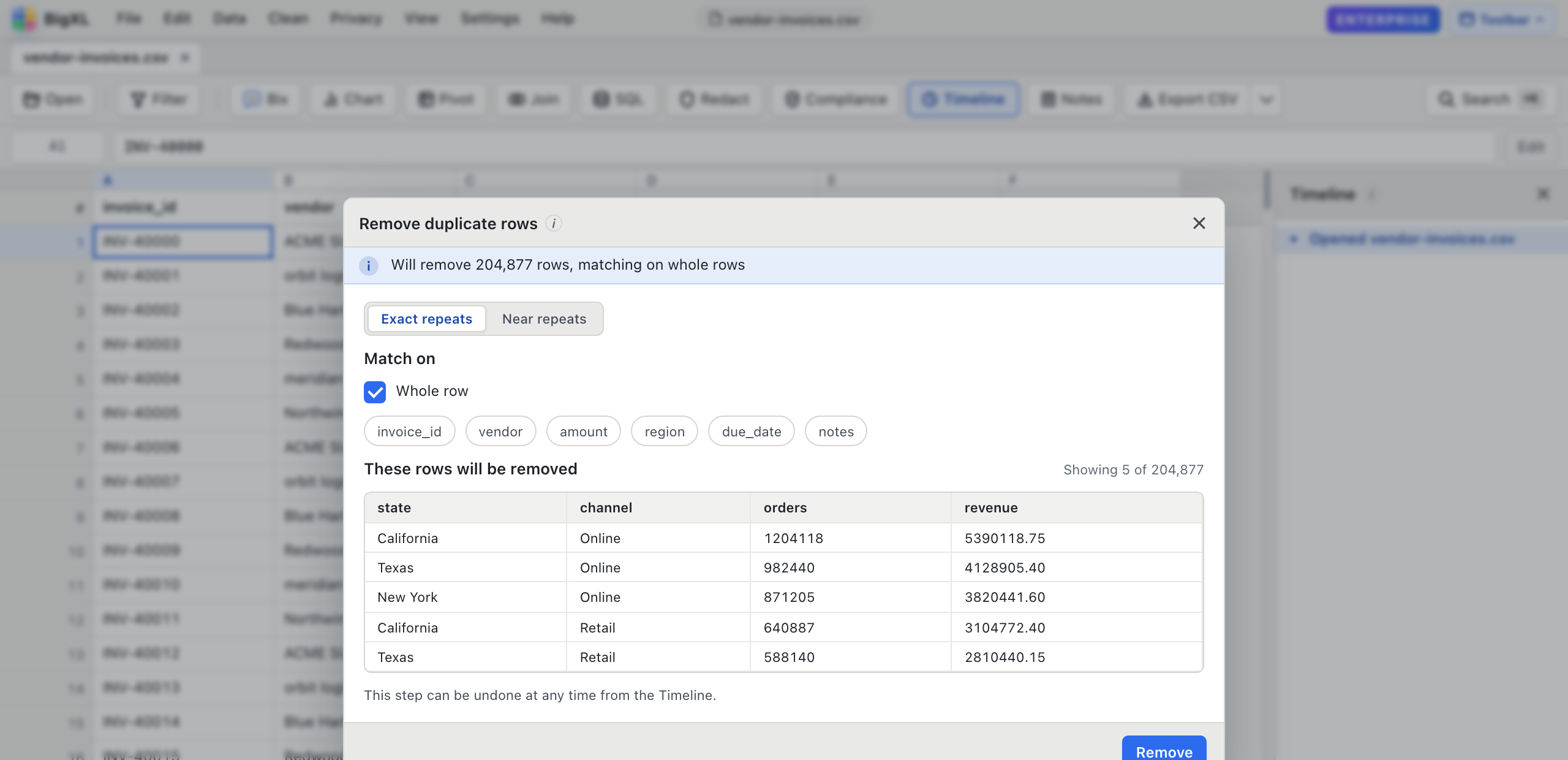
Run the spelling merge first and the repeat check second. A repeat hidden behind ACME Supply Co and Acme Supply Co. is invisible to an exact match, and obvious once the names agree. For a deeper walkthrough see how to deduplicate a large CSV.
Job 4: Comparing this period with the last (audit, legal, finance)
The situation. August and September invoice exports look nearly identical. You need to know what was added, what disappeared, and what changed in the rows that stayed.
The manual way. Two sheets side by side, a VLOOKUP per column, and a lot of eye strain. On files of any real size, VLOOKUP is also where Excel freezes.
The BigXL way. Open Join or compare with another file, choose the key (here, the invoice number) and pick Compare.
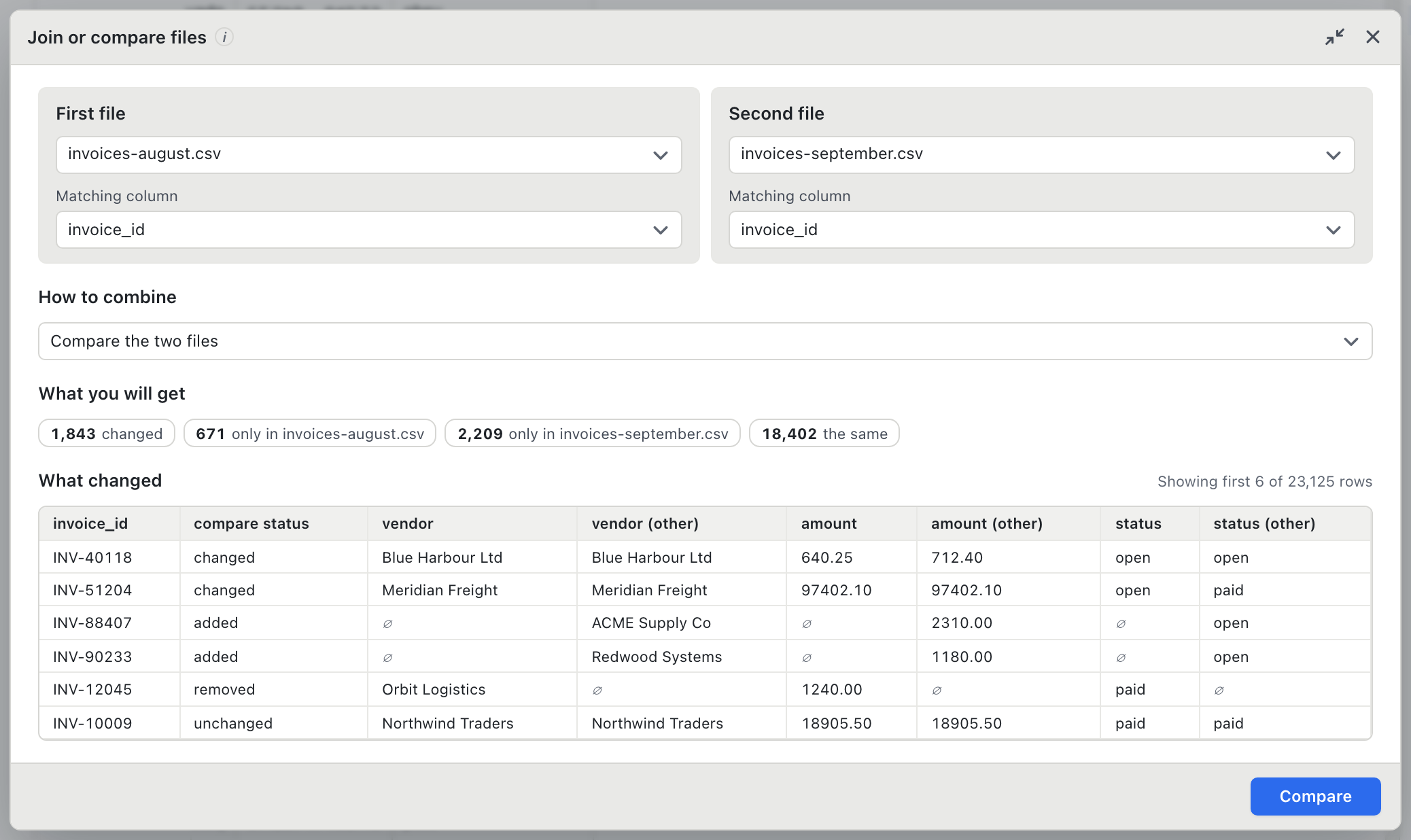
The result opens as its own tab with a status column reading changed, added, removed or unchanged, and both values side by side for every change.
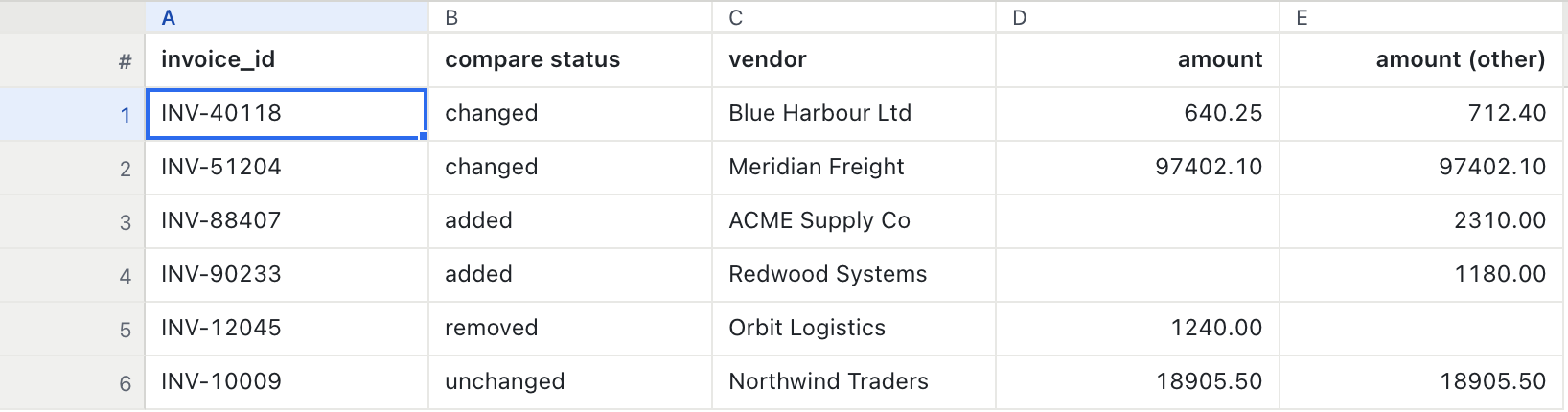
If a key repeats in either file, BigXL warns you before it runs instead of quietly picking one row. That refusal is deliberate: a comparison you cannot trust is worse than no comparison. More in how to compare two CSV files.
Job 5: Hiding personal data before a file is shared (healthcare, HR, legal, investigators)
The situation. A file with names, emails, phone numbers and ID numbers has to go to a vendor, a colleague outside the case, or an auditor. Only some of it may leave your desk.
The manual way. Delete columns, or overwrite cells with asterisks, and hope you did not miss a column or a stray value hidden in a notes field. Then export and hope the original did not travel along.
The BigXL way. Open the redaction wizard.
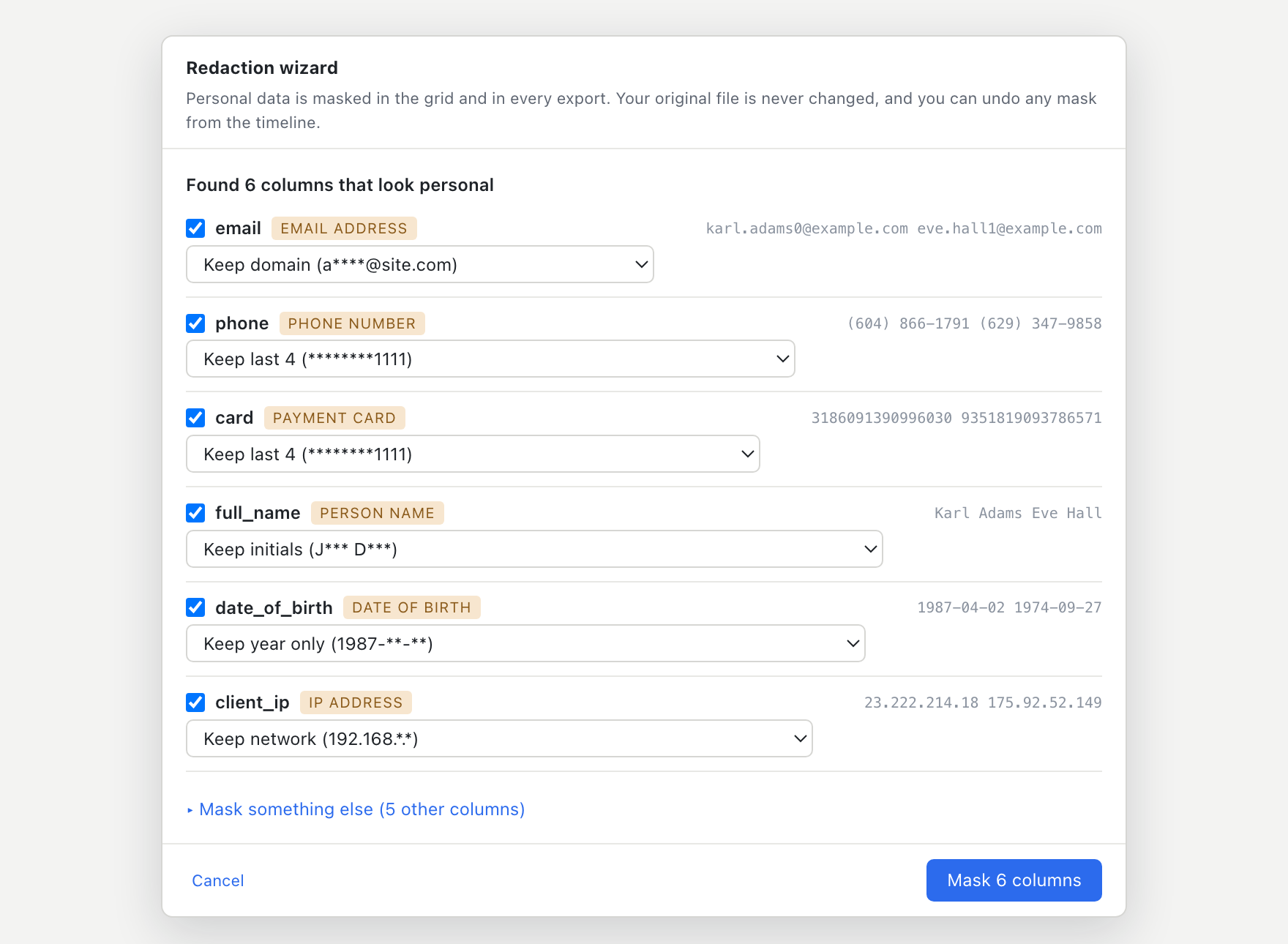
- BigXL scans every column and lists the ones that look like personal data. Card numbers, IBANs and similar identifiers are checked with their built-in check digits, so ordinary numbers are not flagged by mistake.
- For each column you choose how it is masked: hidden completely, keep the last four digits, keep the email domain, keep initials, keep only the year of a date, and so on.
- The mask is applied before anything is exported. A masked column cannot reach a saved file as raw text.
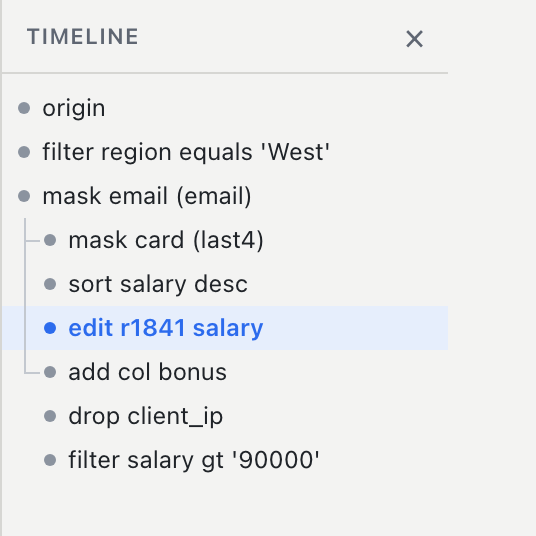
Your original file is never changed. Everything happens in a working layer, and the step is recorded in the history, so there is a clear record of what was hidden and when. The automatic detection is a helper, not a guarantee, so check the result before you share it. Redaction is part of BigXL Enterprise. The longer guide is how to mask personal data in a CSV locally.
What these five jobs have in common
None of them needs a formula, a macro or a line of code. Each one:
- Shows you the effect first. Counts, groups and samples appear before anything changes.
- Can be undone. Every change is a step in a history you can walk back through.
- Can be repeated. Record a cleanup once and replay it on the next file or a whole folder.
- Stays on your computer. There is no upload and no account, which is often the only reason a team is allowed to use it at all.
Which edition do you need?
- Free: open any file at any size, filter, sort, pivot, chart and export to CSV.
- Pro: everything in the cleaning jobs above except redaction, plus recipes, Bix the plain English assistant, the SQL console and Excel export.
- Enterprise: adds redaction, folder-wide runs and the written record of changes.
See pricing for the details, and the 30 day trial if you want to try it on a real file first.
Try it on one real file
Pick the job above that costs you the most time and run it on a copy of a real file. If it saves you the afternoon, you will know straight away. If it does not, you have lost fifteen minutes and your data never left your machine.
Download BigXL and start with the file that has been annoying you the longest.
Common questions
How do I merge company names that are spelled differently in a spreadsheet?
Group the values that differ only in capitals, spacing, punctuation or a small typo, then pick the spelling to keep. BigXL's Merge similar spellings does this on one column, shows how many cells will change, and records the merge as one undoable step. It needs BigXL Pro.
Can I hide names and ID numbers in a spreadsheet before sharing it?
Yes. BigXL scans every column for personal data, lets you choose how each one is masked, and applies the mask before anything is exported, so the original values cannot slip into the saved file. Redaction is part of BigXL Enterprise.
Does any of this need an internet connection?
No. Files are read from your own disk, Bix, the plain English assistant, runs on your own processor, and nothing is uploaded.
Is this a replacement for an eDiscovery or case management platform?
No. Those platforms handle documents, email and images and offer far more. BigXL is for the spreadsheet side of the work: opening, cleaning, combining and comparing tabular files.