Call Detail Record (CDR) Analysis: How to Clean, Correlate, and Analyze Telecom CSVs
Call Detail Record analysis means cleaning and correlating large telecom CSV exports from several carriers. The recurring problems are phone numbers and IMEIs turned into scientific notation, timestamps in different formats and time zones, and files far past what Excel will open. All three have to be fixed before any correlation is trustworthy.
Call Detail Record (CDR) analysis is one of the most critical investigative workflows in law enforcement, criminal defense, corporate internal investigations, and financial fraud litigation. When telecom carriers comply with subpoenas, search warrants, or court orders, they produce records detailing voice calls, SMS messages, cellular data sessions, and Cell Site Location Information (CSLI).
However, the primary practical obstacle investigators encounter after receiving carrier returns is the file format itself. Subpoena returns from carriers like AT&T, Verizon, and T-Mobile arrive as massive, inconsistently formatted CSV or delimited text files containing hundreds of thousands or millions of lines.
Historically, analysts turned to Microsoft Excel to review these records. In modern investigations, relying on Excel creates catastrophic evidentiary risks: scientific notation automatically corrupts 15-digit IMEI numbers, inconsistent carrier timezone schemas create false alibis, and multi-million-row tower dumps exceed spreadsheet row limits.
Here is why traditional spreadsheet software destroys telecom evidence, how to correlate multi-carrier CDRs with device extractions and bank records, and how to analyze large telecom datasets offline without expensive enterprise software suites.
The 3 Critical Traps When Opening CDRs in Excel
When an investigator double-clicks a carrier CSV file to open it in Microsoft Excel, the software attempts to automatically interpret every column. For telecommunications records, this automated parsing causes irreversible damage:
1. The 15-Digit Scientific Notation Catastrophe
Hardware identifiers and SIM numbers are the backbone of device attribution:
- International Mobile Equipment Identity (IMEI) numbers are 15 digits long.
- International Mobile Subscriber Identity (IMSI) numbers are 15 digits long.
- Integrated Circuit Card Identifiers (ICCID) on SIM cards are 19 to 20 digits long.
Excel operates under the IEEE 754 floating-point standard, which only maintains 15 digits of numerical precision. When Excel sees a 15-digit number like 860293049182375, it converts the cell into scientific notation (8.60293E+14). If an ICCID has 19 digits, Excel permanently replaces the final four digits with zeros (8901410321111850000). If an investigator saves the workbook, the true hardware identifiers are permanently destroyed and cannot be recovered from that file.
2. Conflicting Carrier Timezone Schemas
Every major telecom provider reports timestamps differently:
- AT&T: Typically reports call timestamps in Coordinated Universal Time (UTC).
- Verizon: Frequently provides local switch time with an offset column, or reports timestamps in the timezone of the originating switch.
- T-Mobile: Often provides UTC or local time depending on whether the record originates from an older billing system or modern IP Multimedia Subsystem (IMS) logs.
If an investigator pastes AT&T and Verizon records into the same spreadsheet without manual timestamp conversion, a phone call placed at 14:00 UTC (09:00 EST) will appear five hours after a call placed at 10:00 EST. In court, an opposing attorney can easily dismantle a suspect timeline based on unaligned carrier offsets.
3. The 1,048,576 Row Ceiling on Tower Dumps
While a single target’s call history may only span tens of thousands of rows, a “tower dump” warrant (capturing all cellular connections through specific cell sites near a crime scene over a weekend) regularly yields 2 to 8 million records.
Opening a 4-million-row tower dump in Excel silently discards roughly 75% of the file because Excel strictly caps sheets at 1,048,576 rows. Critical connections made by a suspect or burner device are silently dropped.
Carrier Schema Discrepancies (AT&T vs Verizon vs T-Mobile)
Carrier subpoena returns do not follow a universal industry standard. Each telecom provider uses proprietary abbreviations and column arrangements:
| Field | AT&T Example | Verizon Example | T-Mobile Example |
|---|---|---|---|
| Dialed Digits | DIALED_NO |
CALLED_PARTY |
OTHER_PARTY |
| Originating Number | CALLING_NO |
MDN (Mobile Directory Number) |
MSISDN |
| Hardware ID | IMEI_NUMBER |
EQUIPMENT_ID / DEVICE_ID |
IMEI |
| Cell Site ID | FIRST_CELL_ID |
ORIG_CELL_SITE |
CGI (Cell Global Ident) |
| Antenna Azimuth | AZIMUTH (Degrees 0-360) |
ALPHA / BETA / GAMMA or Degrees |
SECTOR_BEAM |
| Duration | Seconds (142) |
Tenths of Minutes (2.4) |
Seconds (142) |
| Timestamp | UTC_START_TIME |
DATE + TIME (Separate) |
CONNECTION_DATE_TIME |
Because of these discrepancies, merging carrier records requires cleaning phone number formats (stripping leading country codes like +1 or international dialing prefixes) and mapping carrier-specific cell IDs to cellular tower databases.
CDR Analysis Tool Comparison
When analyzing telecom records, investigative teams generally evaluate four approaches:
| Solution | Strengths | Limitations | Ideal For |
|---|---|---|---|
| Specialized Law Enforcement Suites (CellHawk, CastViz, ZetX) | Built-in GIS mapping, cell tower sector visualization, automated report generation | Very expensive ($3,000 to $10,000+ per seat license), restrictive law enforcement procurement rules, complex onboarding | Full-time police forensic units with dedicated budgets |
| Microsoft Excel | Familiar interface, already installed on most workstations | Destroys IMEIs via scientific notation, 1M row ceiling, corrupts timestamps, freezes on large files | Basic review of small (under 10,000 row) single-carrier exports |
| Python / Pandas | Handles millions of rows, fully scriptable | Requires software development skills, no visual grid, steep learning curve for litigation teams | Data scientists and technical forensics specialists |
| BigXL | 100% Offline, no row limit, preserves long number strings as text, built-in DuckDB SQL, visual spreadsheet grid, $99 license | No built-in automated GIS mapping engine (exports to Google Earth KML / CSV) | Investigators, private examiners, paralegals, litigation support, fraud analysts |
For private investigators, criminal defense attorneys, corporate fraud investigators, and civil litigation teams who cannot justify an annual five-figure license for proprietary telecom software, BigXL provides an accessible, non-destructive desktop spreadsheet alternative.
Correlating Multi-Source Evidence in Complex Investigations
In financial crime, corporate embezzlement, and organized conspiracy cases, telecommunications data cannot exist in isolation. Examiners must cross-reference CDRs across multiple evidence streams:
- Carrier CDRs + Physical Device Extractions: Correlating carrier switch records with forensic phone extractions from Cellebrite, GrayKey, or Oxygen Forensic Detective. If a target deleted their WhatsApp or SMS call log, carrier-level CDRs confirm that the cellular connection occurred.
- Burner Device Handoff Detection: Comparing multiple carrier files to detect when a target stops using Device A and immediately begins communicating with the exact same inner circle using Device B (burner phone).
- Telecom Records + Bank / ATM Transactions: Merging cellular tower connection timestamps with ATM withdrawal CSVs or merchant point-of-sale logs to prove physical presence at a specific location.
Step-by-Step Workflow: Analyzing CDRs with BigXL
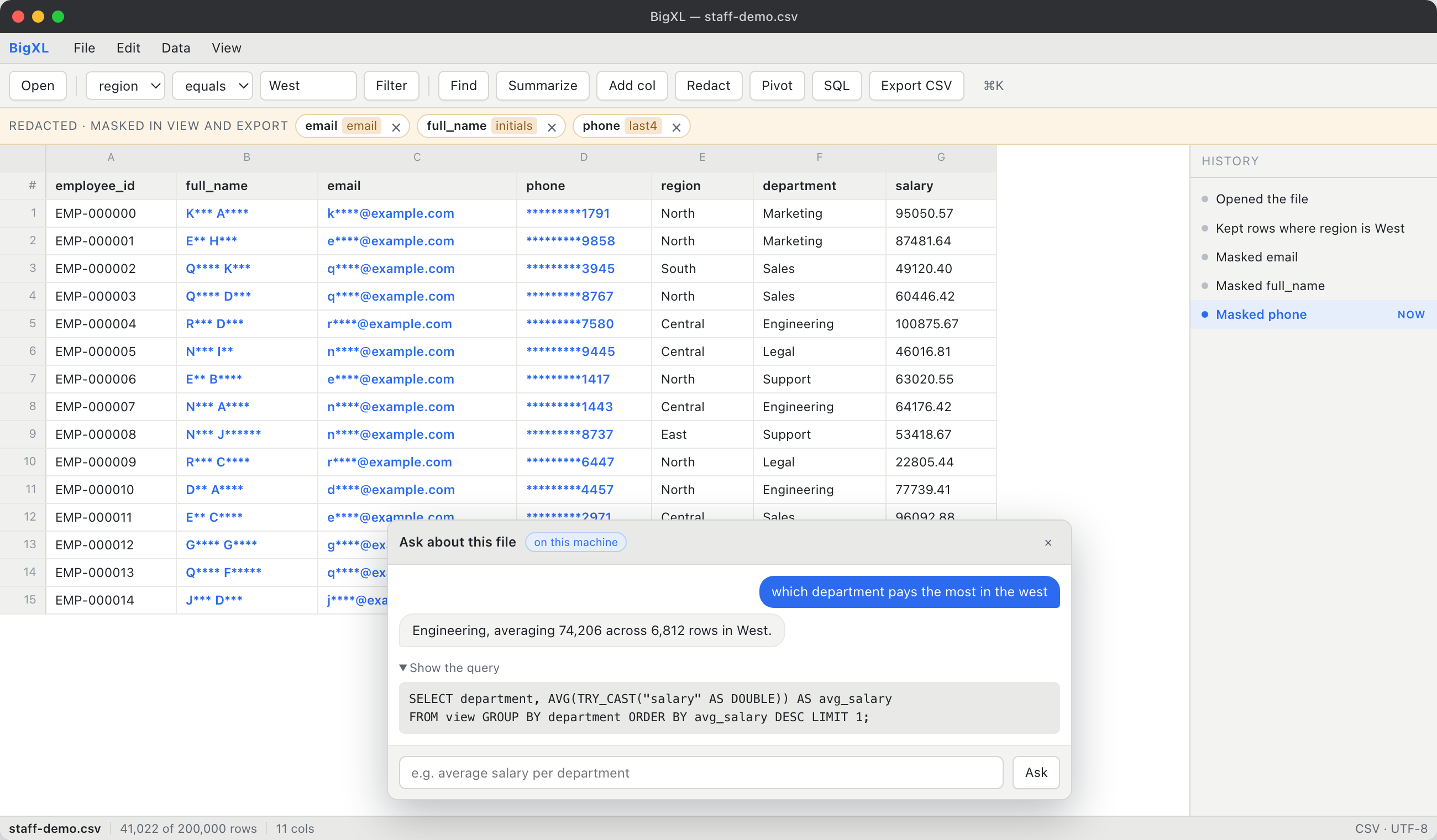
BigXL allows examiners to load multi-gigabyte carrier returns without file size limits, preserving raw strings and enabling local relational joins.
Here is a practical workflow for processing multi-carrier evidence.
Step 1: Open Carrier Files with Zero Identifier Truncation
Drag and drop your raw carrier CSVs into BigXL. BigXL reads columns containing 15-digit and 20-digit numbers as pure text strings by default. IMEI, IMSI, and SIM card numbers remain intact, preventing scientific notation rounding.
Step 2: Clean and Normalize Phone Numbers
Carrier logs often mix formatting styles: some rows contain +1-555-123-4567, while others display 15551234567 or 5551234567.
Use BigXL’s Bulk Clean tools to strip punctuation, dashes, parentheses, and leading trunk codes. Standardizing all phone numbers into a clean 10-digit format (5551234567) ensures that cross-carrier matching functions properly.
Step 3: Standardize Timestamps into Universal UTC
Use the Date Standardizer to normalize separate date and time columns or adjust Verizon local switch times into uniform ISO 8601 UTC. This ensures that every call from every carrier sits on an identical chronological axis.
Step 4: Relational Join with Cell Tower Site Lists
To map cell site IDs to physical latitude, longitude, and antenna azimuth, examiners use a carrier-provided cell site list or public FCC antenna database.
Open the BigXL SQL console and execute a local DuckDB relational join between the CDR activity log and the cell site directory:
SELECT
  c.Timestamp,
  c.CallingNumber,
  c.DialedNumber,
  c.Duration,
  t.TowerID,
  t.Latitude,
  t.Longitude,
  t.Azimuth
FROM 'att_cdr_cleaned.csv' AS c
LEFT JOIN 'carrier_towers.csv' AS t
  ON c.CellSiteID = t.TowerID
  AND c.SectorID = t.Sector
ORDER BY c.Timestamp ASC;
This merges physical geographic coordinates directly onto every call record in seconds, completely offline.
Step 5: Isolate Mutual Contacts and Communication Spikes
Use BigXL’s fast multi-column filters to identify:
- Common contacts: Phone numbers that received calls from both Suspect 1 and Suspect 2 within a 24-hour window.
- Duration anomalies: Filtering out 0-second calls (unanswered attempts) to focus on conversations lasting longer than 180 seconds.
- Nighttime communication: Isolating calls placed between 01:00 and 05:00 UTC.
Export your filtered results to a clean CSV or native Excel file for inclusion in an investigative summary or court exhibit.
Frequently Asked Questions (CDR Analysis)
Why does Excel convert IMEI numbers in CDR files to scientific notation?
Excel uses 64-bit floating-point numbers conforming to the IEEE 754 standard, which can only represent up to 15 significant digits. Because IMEI numbers are 15 digits and SIM ICCIDs are 19 to 20 digits, Excel automatically converts them into scientific notation (such as 8.60293E+14) and replaces trailing digits with zeros upon saving. To avoid this permanent data corruption, analyze CDR files using BigXL, which preserves long numeric identifiers as text strings.
How do I correlate CDR CSV files from different carriers like AT&T and Verizon?
To correlate records across carriers, you must first normalize phone number formats (stripping national prefixes like +1 and punctuation) and standardize all timestamps to UTC. Once both files share a common timezone and number format, use BigXL’s built-in DuckDB SQL console or visual join tools to cross-reference common dialed numbers and co-located cell tower connections.
What tool can open large cell tower dump CSVs that exceed 1 million rows?
Tower dump records routinely contain 2 to 8 million rows, which exceeds Excel’s 1,048,576 row limit. You can open and inspect multi-million-row tower dumps using BigXL, which streams files directly from disk without row caps and allows instant filtering, sorting, and SQL querying on a standard laptop.
Is BigXL safe for confidential law enforcement and litigation data?
BigXL processes records locally and works on air-gapped machines. It does not upload files or send them to cloud databases or third-party AI APIs. A manual update check sends a signed licence key to BigXL to verify coverage. Whether a workflow meets CJIS, privilege, secrecy, or data protection requirements depends on your policies and procedures.
Eliminate spreadsheet corruption and analyze multi-carrier records with confidence. Download BigXL for free on macOS, Windows, and Linux to process large Call Detail Records offline on your own machine.
Common questions
Why do phone numbers break when I open a CDR export?
A 15 digit IMEI or a long international number is read as a number, and anything past 15 digits is replaced with zeros. The identifier is corrupted before you see it, so the column has to be read as text.
How do I correlate CDRs from different carriers?
Normalise the timestamps to one time zone and format first, and the number format second. Once both are consistent you can join the files on the number and build a single timeline.
Can I do this without uploading evidence to a cloud tool?
Yes. BigXL processes evidence locally and does not upload files. Its optional update check sends only the signed licence key, never evidence.