How to deduplicate a large CSV file without running out of memory
To remove duplicate rows from a very large CSV you need a tool that does not hold the whole file in memory. Excel's Remove Duplicates stops at the row limit, and pandas needs several times the file size in RAM. BigXL deduplicates on the columns you choose, across the full file, on an ordinary laptop.
You have a 6 GB web analytics export or customer registration table containing 20 million rows. You need to remove duplicate records based on email address or transaction ID.
You try opening the file in Excel, but it stops at 1,048,576 rows and drops the remaining 19 million records.
You write a quick script in Python using df.drop_duplicates(). Your computer fans spin up, RAM usage climbs to 100 percent, and the process terminates with MemoryError or locks up your desktop for an hour.
Here is the memory math behind why deduplicating large CSV files crashes standard software, and four fast ways to deduplicate multi-gigabyte files without running out of RAM.
The math: memory overhead of in-memory deduplication
Removing duplicates requires checking whether each incoming row has already been seen.
Naive deduplication algorithms store every unique row or hash key in an active in-memory hash set (hash table). The memory footprint grows with the dataset size:
| Dataset size | Raw CSV file size | Python pandas memory footprint | Hash set memory overhead | Total RAM needed |
|---|---|---|---|---|
| 1,000,000 rows | 250 MB | 800 MB | 250 MB | 1.05 GB |
| 5,000,000 rows | 1.25 GB | 4.0 GB | 1.25 GB | 5.25 GB |
| 20,000,000 rows | 5.0 GB | 16.0 GB | 5.0 GB | 21.0 GB |
| 50,000,000 rows | 12.5 GB | 40.0 GB | 12.5 GB | 52.5 GB |
In Python pandas, text columns become Python string objects, which carry a 49-byte object overhead per cell. A 5 GB CSV file expands to 16 GB of DataFrame memory. When drop_duplicates() builds an internal hash lookup table across those rows, it requires another 5 GB of RAM.
If your laptop has 16 GB of memory, your operating system starts swapping memory pages to disk, slowing performance to a crawl before eventually crashing.
Trying to split the large CSV file into smaller parts does not solve this problem either. Deduplicating split files individually misses duplicate records that sit on opposite sides of a split boundary.
Four ways to deduplicate large CSV files fast
Here are four practical methods to remove duplicate rows from huge datasets, ranked from command-line utilities to desktop visual tools.
1. Terminal external merge sort (sort -u) on macOS and Linux
The most memory-efficient way to deduplicate a multi-gigabyte CSV on Unix systems is the native sort command:
# Preserve header and deduplicate remaining rows by whole line
head -n 1 large_file.csv > deduplicated.csv
tail -n +2 large_file.csv | sort -u >> deduplicated.csv
To deduplicate based on a specific column (for example, column 2 separated by commas):
head -n 1 large_file.csv > deduplicated.csv
tail -n +2 large_file.csv | sort -t',' -k2,2 -u >> deduplicated.csv
Why this works: sort uses an external merge sort algorithm. It breaks the file into small chunks, sorts each chunk in memory, writes temporary sorted runs to disk, and merges them. It deduplicates 20 GB CSV files using less than 100 MB of RAM.
2. DuckDB streaming SQL query
If you want to keep the first occurrence of a duplicate row while checking specific columns, use DuckDB:
duckdb -c "COPY (
  SELECT * FROM 'large_file.csv'
  QUALIFY ROW_NUMBER() OVER (PARTITION BY customer_id ORDER BY transaction_date ASC) = 1
) TO 'deduplicated.csv' (HEADER, DELIMITER ',')"
DuckDB executes a columnar streaming window query. If memory fills up, DuckDB spills intermediate partitions to temporary disk storage automatically, so a 50 GB file can be deduplicated on a standard laptop without crashing.
If you are experiencing slow lookups across files, read our breakdown of why VLOOKUP freezes Excel on large sheets.
3. Python chunked hash table with disk storage
If you must use Python, avoid loading the entire file into pandas at once. Process the file in chunks and store seen hashes in a disk-backed key-value store or set:
import pandas as pd

seen_ids = set()
chunk_size = 100000

first_chunk = True
for chunk in pd.read_csv("large_file.csv", chunksize=chunk_size, dtype=str):
    # Filter rows whose customer_id has not been seen
    mask = ~chunk["customer_id"].isin(seen_ids)
    clean_chunk = chunk[mask]

    # Update seen set
    seen_ids.update(clean_chunk["customer_id"])

    # Append to output CSV
    clean_chunk.to_csv("deduplicated.csv", mode="a", index=False, header=first_chunk)
    first_chunk = False
Reading in chunks of 100,000 rows keeps active DataFrame RAM below 500 MB while processing files of any size.
4. BigXL desktop visual deduplication
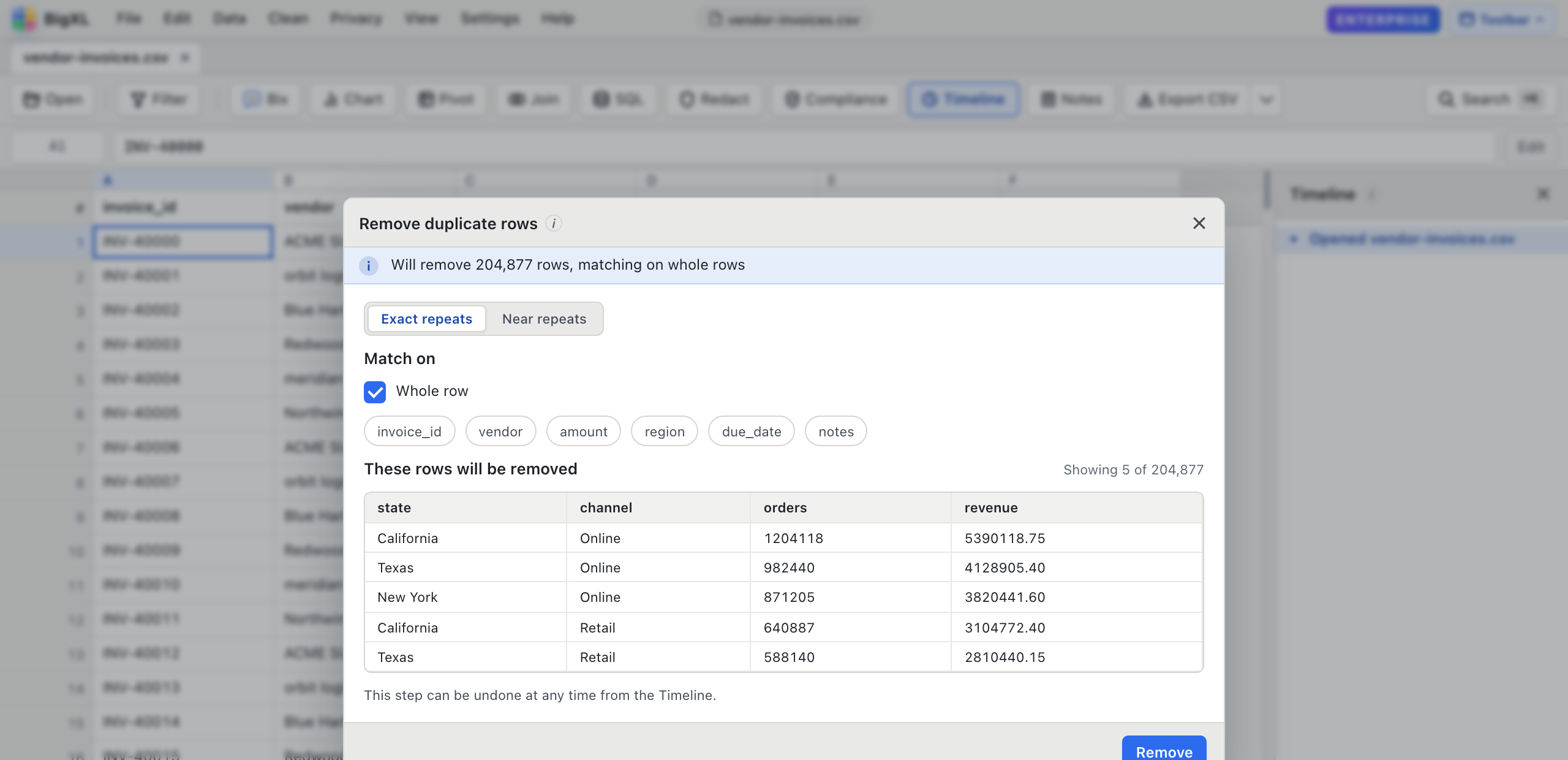
If you prefer a visual interface without writing code or terminal commands, BigXL handles large-file deduplication natively.
When you deduplicate in BigXL:
- Open your CSV file. BigXL streams the rows instantly regardless of file size.
- Click Clean in the toolbar, then select Remove Duplicates.
- Select which columns determine a duplicate record (for example,
emailortransaction_id). - BigXL inspects the full dataset across all CPU cores and shows a live preview of how many duplicate rows were detected before applying the change.
- Click Apply. BigXL removes the duplicate rows using a streaming columnar engine in seconds.
The operation is saved to your Timeline as an undoable step, so you can revert back at any time without re-importing your source file.
If your file has suffered from memory hangs, see our guide on resolving Excel crashes on large CSV files. You can also compare free CSV viewers for large files to see how different tools manage memory.
BigXL runs 100 percent offline on macOS, Windows, and Linux with no network telemetry and total data privacy.
Common questions
How do I remove duplicates from a CSV with 10 million rows?
Use a tool that streams the file rather than loading it. Excel cannot reach 10 million rows at all, since it stops at 1,048,576.
Should I deduplicate on the whole row or on one column?
It depends what a duplicate means to you. Matching the entire row only removes exact copies, while matching on an ID or email finds records that are the same entity with slightly different details. Choose the columns deliberately. If the repeats differ by a capital, a space or a typo, exact matching misses them, and a near-repeat check is the tool for that; see [how to remove near-duplicate rows](/blog/remove-near-duplicate-rows-csv/).
Will deduplicating change my original file?
Not unless you save over it. Work on a copy if the source file is the only one you have.