How to Merge CSV Files With Different Columns Without Corrupting the Data
To merge CSV files whose columns differ you have to match them by column name, not by position. Joining the files end to end with cat or copy and paste lines up the wrong values whenever a header is renamed, reordered or missing, and nothing warns you. The result looks fine and is quietly wrong.
You have a folder of exports that should be one table. Thirty branch reports, a dozen carrier extracts, twelve months of the same report. They are supposed to be identical in shape.
They are not. One file calls the column Full Name, another calls it name. One has the columns in a different order. One has an extra column nobody mentioned. And the moment you merge them wrong, you get a file that looks perfectly fine and is wrong in the middle.
This is the single most dangerous CSV job, because the failure is silent. Here is why the usual methods break, and how to merge by column name so they cannot.
Why cat and copy-paste corrupt merged CSVs
The advice you will find first is to concatenate the files:
cat *.csv > combined.csvThat has two failure modes, and the second one is the one that hurts.
It repeats the header row. Every file after the first contributes its header as a data row. That one is obvious, and the usual fix is:
head -n 1 first.csv > combined.csv
tail -n +2 -q *.csv >> combined.csv
It merges by position, not by name. This is the silent one. cat does not read your headers. It stacks lines. If january.csv is id,amount and february.csv is amount,id, then after the merge every February amount is sitting in the id column and every February id is in amount.
Nothing errors. The file opens. The row count is right. The totals are wrong, and you will find out weeks later, if at all.
The same applies to copy-paste into a master sheet, with the added problem that Excel stops accepting rows at 1,048,576.
Merge by column name instead
The fix is to match on the header, not the position, and to be told about anything that does not line up.
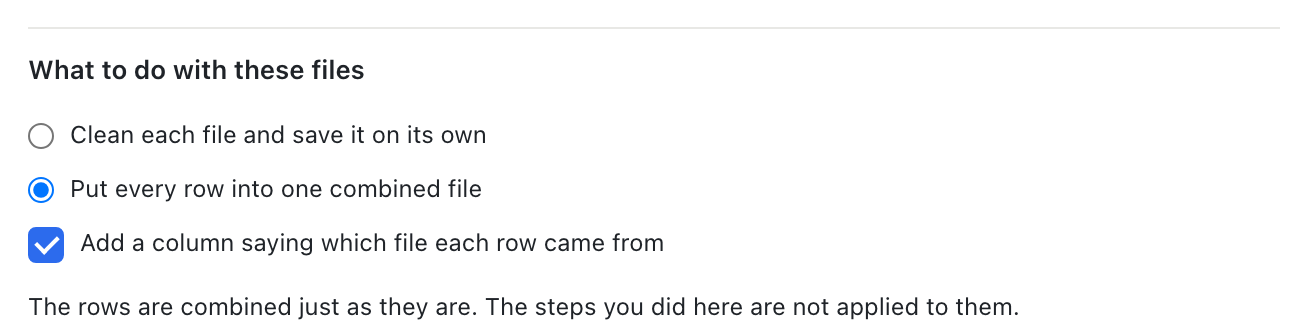
In BigXL, File, Run this cleanup on a folder, then Put every row into one combined file. What that changes:
- Reordered columns line up.
amount,idandid,amountboth land in the right place, because the match is on the name. - An extra column does not fail the run. If one file has a
notecolumn the others lack, the merged table gets anotecolumn and the other rows leave that cell blank. Nothing is dropped and nothing is misaligned. - Every row can say where it came from. Tick Add a column saying which file each row came from and you get a
source_filecolumn holding the file name. This is the thing you always want twenty minutes later, when one branch’s numbers look wrong and you need to know which file to go back to.
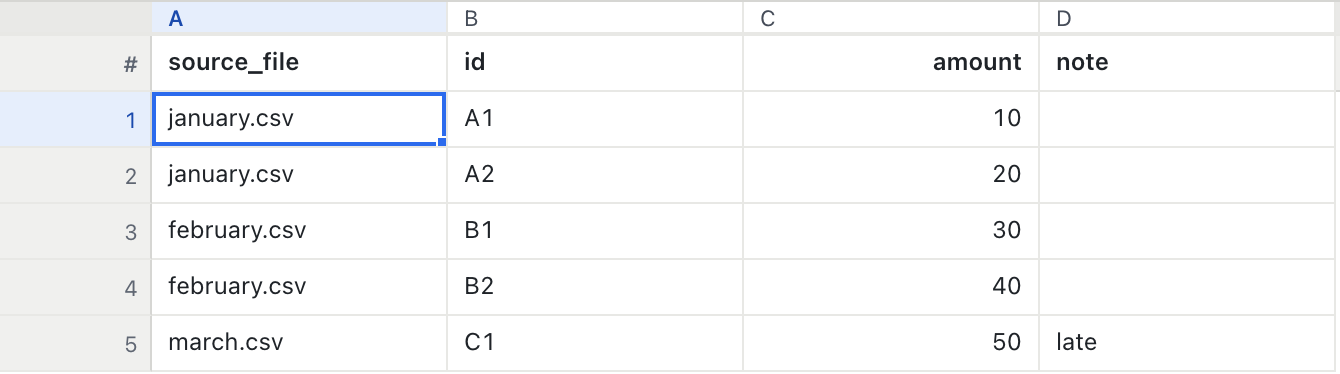
Look at what that produced. february.csv stored its columns as amount,id, the reverse of the others, and B1 still landed under id. march.csv was the only file with a note column, and the other four rows are blank there rather than shifted by one.
The run reports what it did: “5 rows from 3 files, 4 columns.” Those are the three small files at the end of this post, so you can reproduce exactly this. On a real folder, check that file count: if it is lower than the number of files in the folder, something was skipped and you want to know before you start analysing.
When the column names are actually different
Matching by name solves reordering. It does not solve renaming. If one export says Full Name and your process expects name, no amount of name matching will connect them, because they are genuinely different names.
There are two honest options, and one dishonest one.
The dishonest option is fuzzy matching: the tool decides Full Name and name are the same thing and merges them for you. This works until the day it quietly maps shipping_date onto date and nobody notices.
The honest options are to fail, or to ask once and remember the answer.
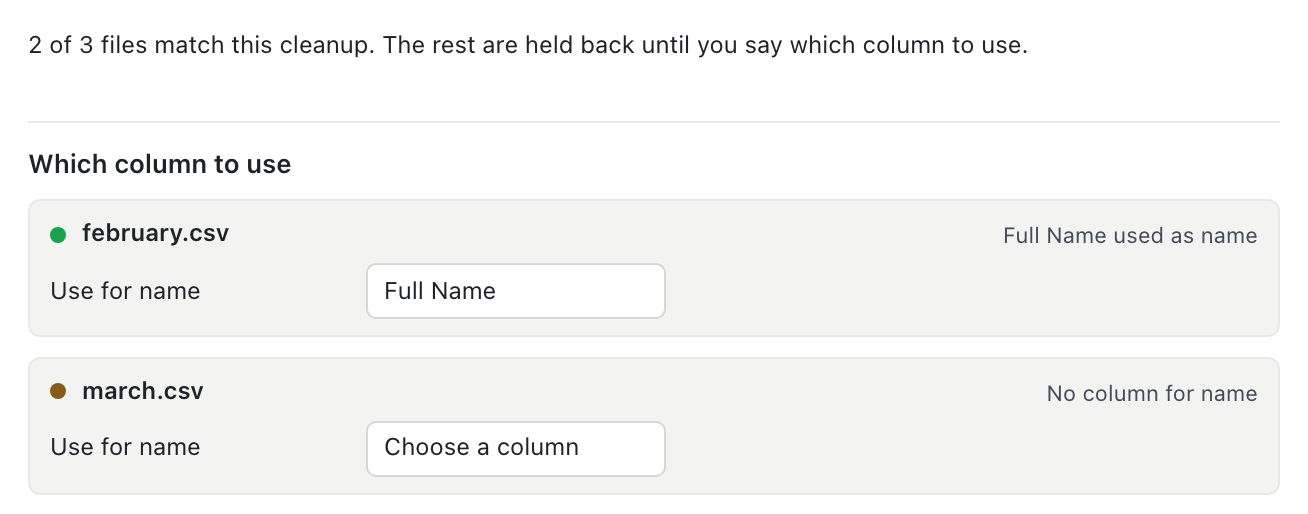
BigXL reads every file in the folder before it runs anything and tells you how many match. Each file that does not match is listed with what is missing and a dropdown of that file’s own columns. Full Name is suggested for name, because it normalises to the same letters, but you confirm it. The mapping is saved, so next month the answer is already there.
Files you do not map are held back. They appear in the results with the reason, and no output file is written for them.
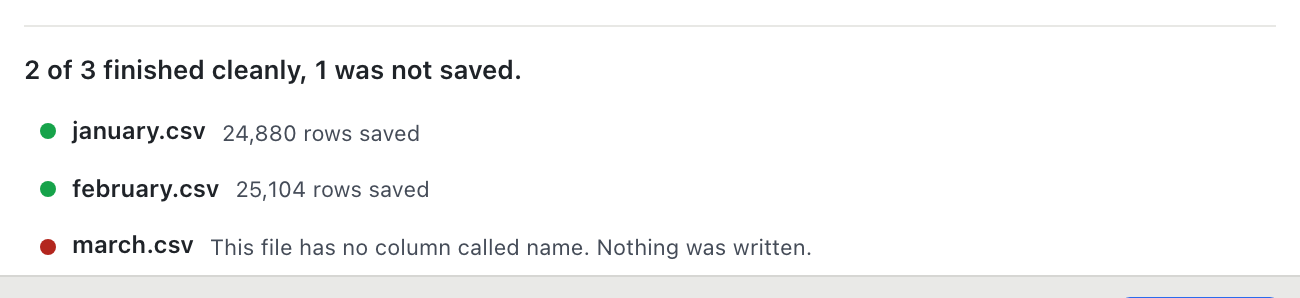
That is the behaviour you want from a batch job. A run that half processes a file it did not understand gives you an output you cannot trust and no reason to distrust it.
The case that should worry you most
Here is the specific failure worth being precise about, because it is invisible and it involves personal data.
Say your saved cleanup masks an email column before the file leaves your machine. Next month the file calls that column e_mail.
A tool that applies the steps it can and skips the steps it cannot will skip the mask, then write the output anyway. The file looks completely normal. The addresses are in it, in plain text, and nothing told you.
BigXL refuses. If a recipe step hides personal data and the column it needs is not there, that file fails and nothing is written. Redaction you asked for is not optional, and “the column moved” is not a reason to quietly stop doing it. If you want the masking itself, that is done locally too.
Merging is not joining
Two different jobs get called “merge”, and mixing them up wastes an afternoon.
| You want | The operation | Result |
|---|---|---|
| The same columns, more rows | Merge, stack, append | 3 files of 1,000 rows become 3,000 rows |
| The same rows, more columns | Join | Add price from a lookup file onto your orders |
| To know what changed between two versions | Compare | Added, removed and changed rows |
This post is about the first. If you are bringing a column across from another file, that is a join, and VLOOKUP on a large file is the slow way to do it.
Try it on files where you know the answer
Three files with deliberately awkward headers, so you can see the difference between merging by name and merging by position:
mkdir -p merge-test && cd merge-test
printf 'id,amount\nA1,10\nA2,20\n'        > jan.csv
printf 'amount,id\n30,B1\n40,B2\n'        > feb.csv
printf 'id,amount,note\nC1,50,late\n'     > mar.csv
Merge them with cat and look at feb’s rows: 30 will be under id and B1 under amount. Merge them by name and they land correctly, with note blank for the four rows that never had one.
Five rows, three files, four columns. Small enough to check by eye, which is the only way to learn to trust a merge before you run it on three million rows.
BigXL merges the files on your machine without uploading them or requiring an account, which matters when the folder contains carrier data, payroll or medical records that policy forbids you to send anywhere. The rest of the recurring cleanup jobs are in this walkthrough.
Common questions
Why does combining CSV files with cat or copy corrupt the data?
Those methods stack rows by position. If the second file has its columns in a different order, every value lands in the wrong column, and if a header row is included mid-file it becomes a data row.
What happens to columns that only exist in one file?
They should be kept, with blanks for the rows that do not have them. Dropping them loses data and forcing them into another column corrupts it.
How do I merge files by column name?
BigXL matches on header name and shows you what it will do before writing anything, including which columns appear in only some of the files.