How to Join Two Large CSV Files Without Freezing Excel
To join two large CSV files you match them on a shared key column, such as a customer ID, in one pass. Doing it with VLOOKUP across multi-gigabyte files freezes Excel, because it rescans the second file for every row. BigXL joins the two files on the key you pick and keeps the full result, with no row limit.
You have two large CSV files: a 4 GB export of order transactions and a 2 GB lookup file of customer profiles. You open both files in Excel, write a VLOOKUP or XLOOKUP formula to match customer IDs, press Enter, and drag the formula down.
Instantly, Excel freezes, your CPU fan spins at maximum speed, and “Not Responding” appears across your screen.
Here is why joining large CSV files freezes standard spreadsheet tools, and how to merge datasets containing tens of millions of rows quickly and safely.
Why VLOOKUP freezes on large datasets
To understand why your computer locks up, look at how spreadsheet lookups work under the hood:
- Quadratic comparison time. A standard
VLOOKUPsearches line by line through the lookup table for every single row in your primary table. If your primary table has 10 million rows and your lookup table has 5 million rows, Excel performs up to 50 trillion comparisons. - Double memory pressure. To perform a lookup across two files in Excel, both files must be fully loaded into memory simultaneously. Two CSV files totaling 6 GB on disk can easily consume over 30 GB of active RAM in Excel.
- Single-threaded formula evaluation. Excel evaluates lookup formulas primarily on a single CPU core. While your computer may have 8 or 16 CPU cores, one core gets maxed out at 100% while the rest sit idle.
Command-line and script approaches to join large CSVs
If you know command-line tools or programming languages, there are script-based ways to join large CSV files.
1. Linux / macOS join command
On UNIX systems, the native join command can merge two sorted CSV files on a common key column:
join -t',' -1 1 -2 1 <(sort -t',' -k1,1 orders.csv) <(sort -t',' -k1,1 customers.csv) > merged.csvWhile fast, this requires sorting both input files on disk first and only works on exact field delimiters.
2. Python pandas pd.merge()
In Python, pandas provides data frame merging:
import pandas as pd

orders = pd.read_csv('orders.csv')
customers = pd.read_csv('customers.csv')
merged = pd.merge(orders, customers, on='customer_id', how='inner')
merged.to_csv('merged.csv', index=False)
However, pandas loads both data frames into system RAM. If the combined size exceeds your physical RAM, Python throws a MemoryError or crashes.
Joining large CSV files in a visual spreadsheet interface
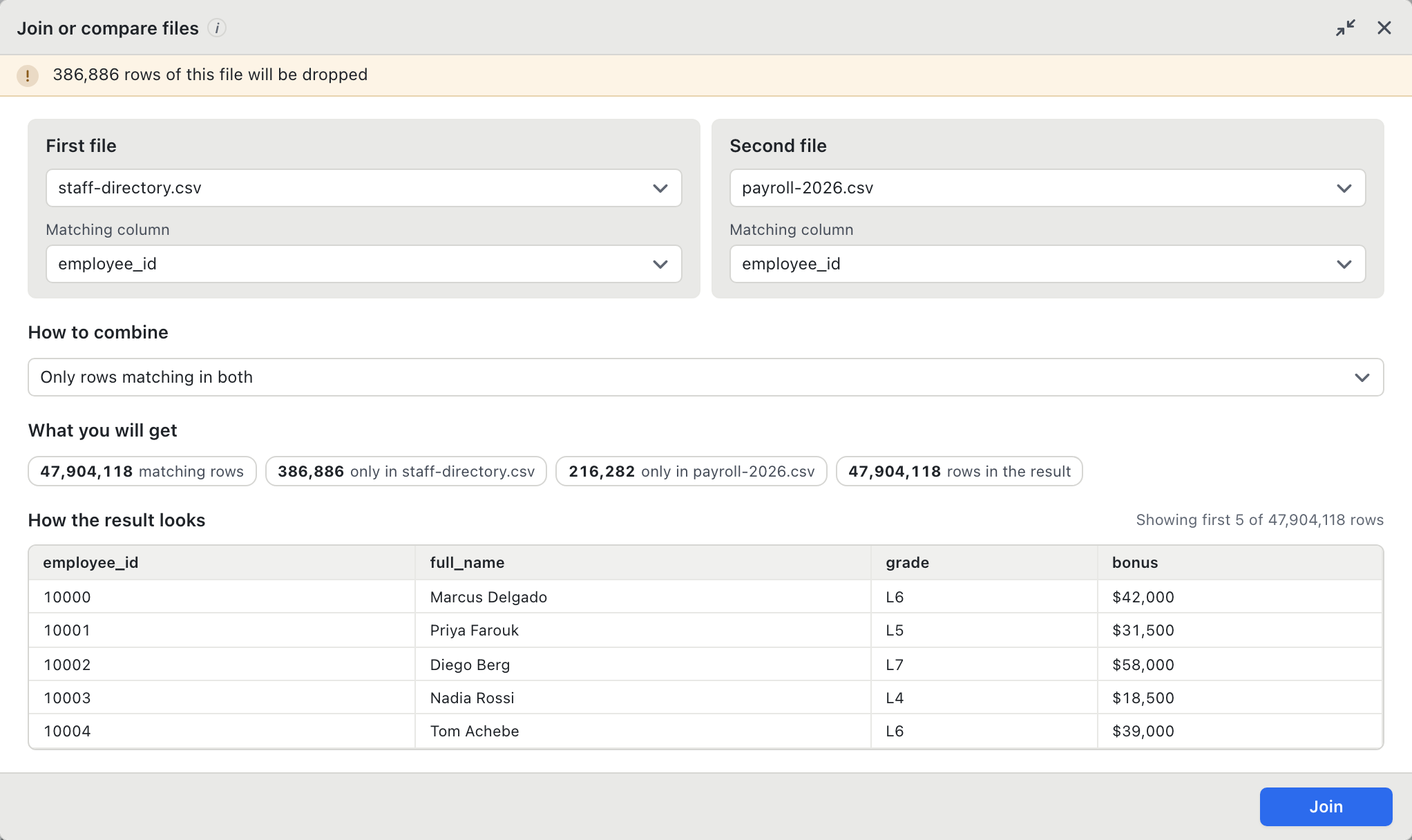
If you do not want to write code or run terminal commands, you need a desktop application designed to execute disk-based joins with a visual interface.
BigXL handles multi-gigabyte joins natively using an optimized DuckDB query engine.
- Pre-join match inspection. Before running the join, BigXL scans both files and shows you the exact match rate (e.g., 94.2% matched rows, 5.8% unmatched rows) so you can catch mismatched key formats before committing.
- Inner, Left, and Outer joins. Choose your join type visually with a single click.
- Zero memory crashes. BigXL uses disk-backed hash joins, allowing you to join a 10 GB file with a 5 GB file on a standard 16 GB laptop without freezing.
- Export directly. Send the combined dataset straight to a new CSV, Parquet, or Excel workbook.
- Private and local. Both files are processed entirely on your local machine without uploads.
Stop waiting hours for VLOOKUP to freeze your machine. Join your large CSV files in seconds with BigXL.
Common questions
How do I join two CSV files on a common column?
Pick the column both files share, then join on it. BigXL asks which column to match and whether to keep rows that have no match on the other side.
What if the key columns have different names?
That is normal, and it does not matter. You choose the column on each side separately, so customer_id can be matched against CustomerID.
Why does VLOOKUP freeze on files this size?
It searches the whole lookup range again for every single row, so the work grows with the square of the row count. A proper join reads each file once.